
Document it before you touch it.
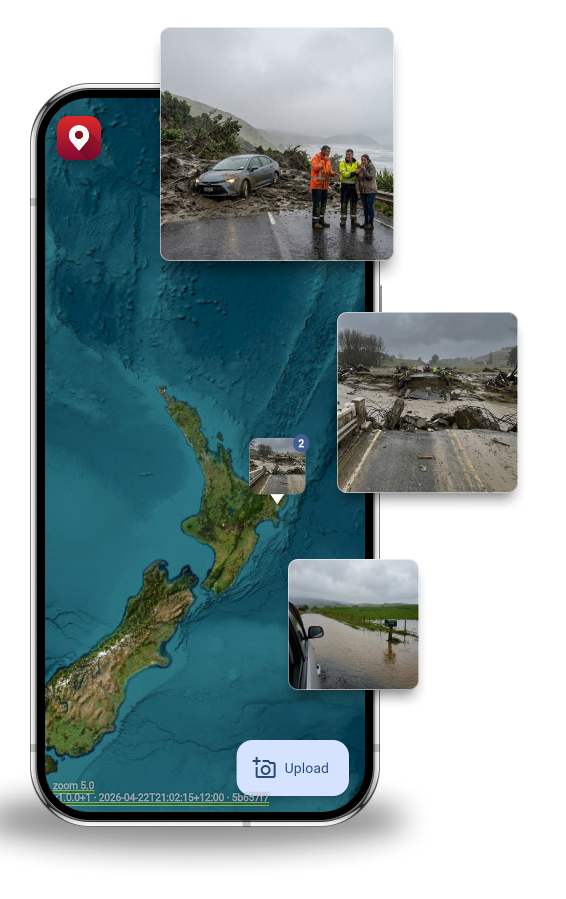
Site conditions change the moment you start work. GeoMarqr lets your members Marq the scene before the job begins — timestamped, geotagged, locked in.
For NZ Crane Association Members
Your members are on complex sites, in remote locations, often with no connectivity. GeoMarqr works offline — take the photo on site, and it uploads from that location when coverage returns. The pin is always accurate. Pre-lift site documentation is already industry practice. GeoMarqr makes it automatic.
We built GeoMarqr after spending time with heavy equipment operators on the East Coast during Cyclone Gabrielle. No signal, wrong location pins, crews driving to the wrong road. The crane industry knows better than most what happens when ground conditions aren't documented before the job starts.
What it adds to pre-lift documentation
-
Timestamped, geotagged pre-lift record
Site conditions documented before the job starts. Geotagged to the site location, timestamped at capture. Locked in before you lift — independent of what happens after.
-
Offline-first for remote sites
Your members work in places without coverage. GeoMarqr works offline — capture on site, upload from the original location when connectivity returns. The pin is always accurate.
-
Condition intelligence for the next crew
When access conditions change, ground is unstable, or infrastructure is compromised, that information travels with the GeoMarqr — not stuck in someone's camera roll.
-
Area reports for member safety briefings
Pro tier: date-range filtering and area reports. Know which sites keep generating reports before you send the next crew. Brief members before they arrive.

Remote sites. No coverage. Still works.
Pre-lift documentation is only useful if it's accurate. GeoMarqr captures GPS coordinates at the moment of capture — not at the moment of upload. Your members can document on the most remote site in the country and the pin will be right when it uploads later.
- GPS captured at point of photo
- Works in full dead zones
- No account required to document
- Uploads from original location
Eyes on site are invaluable. GeoMarqr makes sure those eyes count.
Plans
Start for free — no account needed.
Individual
Anonymous
No account. No barrier. Just the photo.
- Anonymous upload
- AI tags & filters
- 5-day auto-delete
- Offline-first upload
- No ads
- Manage your images
- Date-range filtering
- Hot zone detection
Free Account
Keep track of your uploads across devices.
- Anonymous upload
- AI tags & filters
- 5-day auto-delete
- Offline-first upload
- Manage your images
- Save custom filters
- No ads
- Date-range filtering
- Hot zone detection
Pro $9 NZD/mo
For curious explorers, motorhome travellers, and anyone who wants more — and wants to keep the lights on.
- Everything in Free Account
- No ads
- Date-range filtering
- Hot zone detection
- Area activity reports
- Supports the network
Team & Enterprise
Team $30 NZD/seat/mo
Private workspace for your crew. Send clients a link to upload their own photos — straight into your team.
- Everything in Pro
- Private team workspace
- Controlled photo visibility
- 100 client upload links/seat/mo
- Client uploads stay in your team
- Inspector-ready sharing
Enterprise
For councils, not-for-profits, research institutions, and innovation teams doing important work.
- Everything in Team
- No ads
- RapidMiner / Mendix integration
- Data science API access
- Custom data exports
- Dedicated support
- Education & not-for-profit pricing
Get in Touch
Tell us about your organisation and what you're building. We'll get back to you shortly.
[ Contact form goes here — e.g. Tally, Typeform, or similar ]
Privacy
- No account required to upload
- Auto-deletes after five days — nothing stored permanently
- Geotagged at point of capture, not point of upload
- Anonymous by default
The job site looked fine on the plan.
GeoMarqr shows you what it looks like on the ground.
View the Live Map Download the App — No Signup Needed